Build your own physical interface with the new Arduino® UNO™ Q SBC Controller Bundle
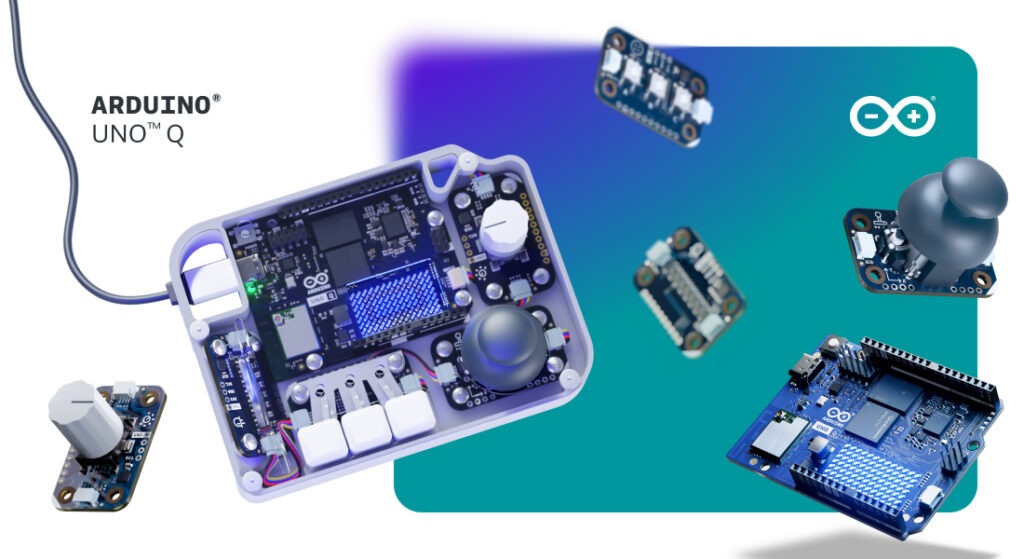
When running UNO Q as a standalone single-board computer, navigating its Linux desktop environment doesn’t have to mean reaching for a standard mouse and keyboard. One of the most rewarding aspects of combining microcontrollers with a full operating system is the freedom to design custom physical interfaces – turning buttons, knobs, and joysticks into direct, tactile controls for your software.
To support that experience, we’re introducing the UNO Q SBC Controller Bundle. Designed for makers, learners, and innovators, this kit brings together hardware, software, and step-by-step guides to help you build a customized control setup.
What’s included in the box?
At the heart of the bundle is the dual-brain UNO Q 4GB board. To create a physical input layout as an alternative to certain traditional input functions, the kit includes a curated set of Arduino® Modulino™ nodes: Buttons, Joystick, Knob, and Pixels for dynamic visual feedback.
The included components connect through the Arduino® App Lab development environment. To give your finished project a clean, product-like appearance, we also offer a downloadable, 3D-printable enclosure that you can print or modify for your design.
Bringing physical control to your Linux workflows
Running Linux directly on your development board supports a range of potential applications, as we recently explored in our overview of what Linux unlocks on the UNO Q board. Whether you’re managing local Home Assistant dashboards, launching retro games, or controlling edge AI routines, physical controls provide another way to interact with your system.
Building your own controller offers a hands-on way to explore human-machine interaction, helping you learn how physical inputs translate into operating system commands. Thanks to the modular nature of the Modulino ecosystem, the setup is designed to be flexible – you can reconfigure supported input mappings or swap in compatible components as your project evolves. Detailed walkthroughs are already available here on Arduino Project Hub with instructions for assembling the featured configuration.
Completing your desktop setup
If you’re turning your UNO Q into a complete desktop station, a few optional accessories can round out your build. The Arduino® USB-C Hub (8 in 1) adds HDMI output, Ethernet, and extra USB ports, while the official Arduino USB-C Power Supply (45W) and Arduino USB-C Cable (24 pin) are designed to provide compatible power delivery for the UNO Q setup.
Head over to the Arduino Store to explore the new UNO Q SBC Controller Bundle, download the 3D-printable files, and start crafting your own custom hardware interface today!
Arduino, UNO, and Modulino are trademarks or registered trademarks of Arduino S.r.l.