You can now use Wi-Fi® and Bluetooth® LE simultaneously on Arduino NINA-based boards! Here’s how
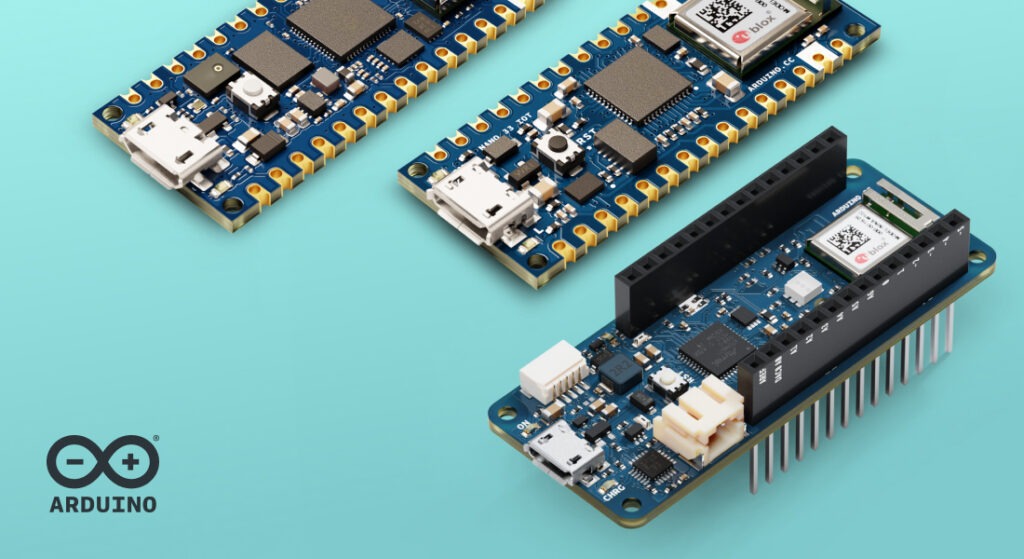
If you like IoT, you’ll love this update! Starting today, if you own a board powered by the NINA-W102 module – like the Arduino® MKR™ WiFi 1010, Arduino® Nano™ RP2040 Connect, or Nano 33 IoT – you can now use Wi-Fi and Bluetooth Low Energy (Bluetooth LE) at the same time, in the same sketch!
What changed?
Until recently, on boards using the NINA-W102 module, you had to choose between Wi-Fi or Bluetooth LE for connectivity.
This was due to hardware limitations that required shared communication interfaces for both functionalities, and the firmware implementation couldn’t support concurrent usage. With the latest updates, this limitation is gone – everything now works seamlessly together.
What you need
To use both Wi-Fi and Bluetooth LE at the same time, make sure you’ve updated all of the following libraries:
- WiFiNINA library version 2.0.0 or later
- ArduinoBLE library version 2.0.0 or later
And firmware:
- NINA-W102 firmware version 3.0.1 or later
All three components must be updated to the latest versions for simultaneous usage to work.
How to update WiFiNINA and ArduinoBLE libraries
The update is straightforward and requires only two steps:
- Open the Library Manager in the Arduino IDE.
- Search for WiFiNINA and ArduinoBLE, and make sure you’re using version 2.0.0 or later.
Done!
If you need more detailed guidance about installing or updating libraries, check out this tutorial in Arduino Docs.
How to update the NINA-W102 firmware
- Open the Firmware Updater Tool in the Arduino IDE:
Tools > WiFi101 / WiFiNINA Firmware Updater - Select the right board and port, then flash firmware version 3.0.0
If you need help updating the NINA-W102 firmware, this guide walks you through it.
And if you’re not sure which NINA-W102 firmware version is currently installed on your board, just find out by following the instructions here.
Check if your board is compatible
The following boards powered by the NINA-W102 module support simultaneous Wi-Fi® and Bluetooth® LE in the same sketch:
- MKR WiFi 1010
- Nano RP2040 Connect
- Nano 33 IoT
The Arduino® UNO™ WiFi Rev2 board also features the NINA-W102 module, but cannot run Wi-Fi and Bluetooth LE together in the same sketch due to limited memory. You can still use both features, just not at the same time. Make sure to install the latest updates for this board too, to ensure full compatibility and avoid issues.
Get started with our example sketch
To make things as easy as possible, here is a ready-made sketch you can use to set up both Bluetooth LE and Wi-Fi. It connects to a Wi-Fi network and starts Bluetooth LE advertising:
#include <WiFiNINA.h>
#include <ArduinoBLE.h>


char ssid[] = "yourSSID";       // your network SSID (name)
char pass[] = "yourPassword";   // your network password (use for WPA, or use as key for WEP)


int status = WL_IDLE_STATUS;


void setup() {
 Serial.begin(9600);
 while (!Serial);


 String fv = WiFi.firmwareVersion();
 if (fv < "3.0.0") {
   Serial.println("Please upgrade the firmware, you can't run both WiFi and BLE with this version");
 }


 // attempt to connect to WiFi network:
 while (status != WL_CONNECTED) {
   Serial.print("Attempting to connect to SSID: ");
   Serial.println(ssid);
   // Connect to WPA/WPA2 network.
   status = WiFi.begin(ssid, pass);


   // wait 10 seconds for connection:
   delay(10000);
 }
 Serial.println("Connected to WiFi");


 // Initialize BLE
 if (!BLE.begin()) {
   Serial.println("Failed to initialize BLE!");
   while (true);
 }


 // Set BLE device name and local name
 BLE.setLocalName("ArduinoPeripheral");


 // Create and add a dummy BLE service
 BLEService dummyService("180A"); // UUID for the Device Information service
 BLE.addService(dummyService);


 // Start BLE advertising
 BLE.advertise();
 Serial.println("BLE advertising started...");
}


void loop() {
 // Add logic here to handle BLE connections or WiFi tasks if needed
}
Troubleshooting-ready resources for you!
If the setup is not working out as expected, here are the first things you can check to make sure you get back on track.
- Check all versions: Make sure your WiFiNINA library, ArduinoBLE library, and the NINA firmware are all updated to the latest supported versions.
- Library dependencies: The WiFiNINA library update should automatically install Arduino_SpiNINA. If you encounter a compilation error, verify that it is correctly installed.
- Re-flash the NINA firmware using the Wi-Fi Firmware Updater.
- Check that you’re using a supported board.
- Make sure you’re selecting the correct board and port in the Arduino IDE.
- Update the board package from the Board Manager to the latest version. If you’re not sure how, just follow this guide.
If all else fails, remember you are part of a community and can ask other Arduino users to help you out on Arduino Forums!
Technical insight: why it works now
If you want to dig deeper and understand not only how to leverage the update, but what made it possible, we’re happy to share the technical details with you.
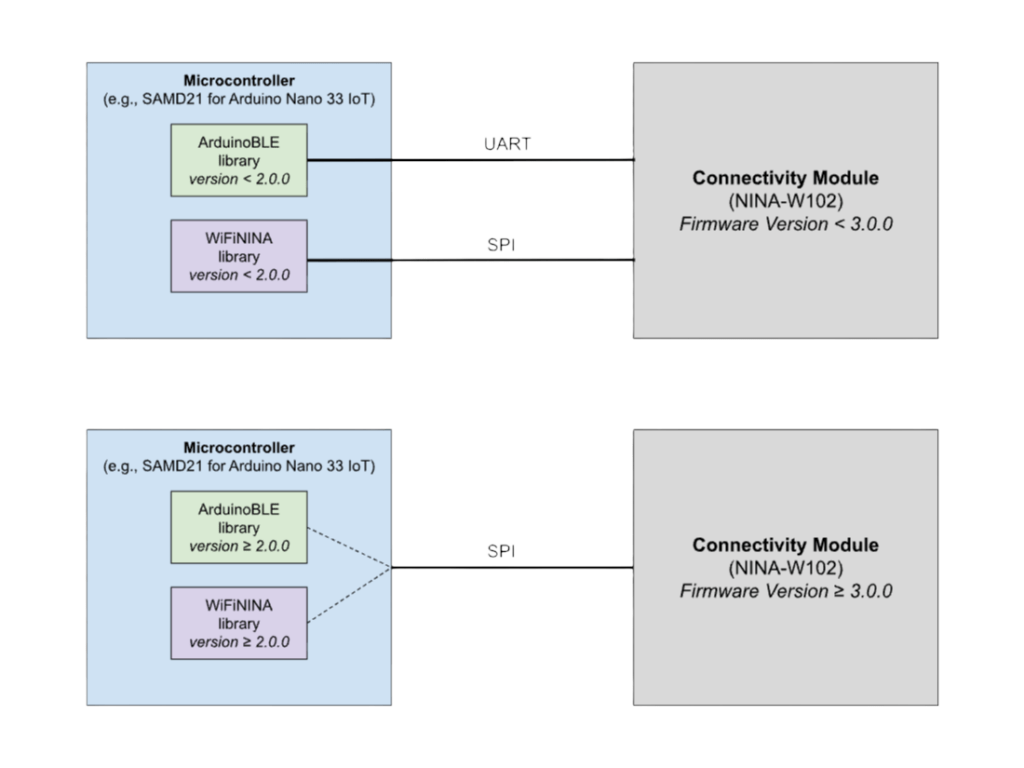
The boards compatible with the update use the u-blox NINA-W102 module to handle both Wi-Fi and Bluetooth LE connectivity. These boards feature a main microcontroller (such as the SAMD21 on the Nano 33 IoT) where your sketch runs, and a separate module responsible for managing wireless communication (the NINA-W102). The main microcontroller communicates with the NINA module using different interfaces: SPI is used for Wi-Fi, while previously Bluetooth LE was handled via UART. In order to avoid limiting the number of peripherals available to the user, these interfaces (SPI and UART) shared some of the same GPIO pins.
With recent updates, Bluetooth LE has also been moved to the SPI interface, allowing both Wi-Fi and Bluetooth LE to operate concurrently over the same bus. This architectural change eliminates the hardware-level conflict, enabling the simultaneous use of Wi-Fi and Bluetooth LE in sketches.
Ready to unlock the full IoT potential of your Arduino board?
These few adjustments make your Arduino board way more powerful. Whether you’re building IoT devices, sensors, or Bluetooth LE applications that need to report data over Wi-Fi, it’s now all possible in a single sketch.
We can’t wait to see what you build with this powerful combo, so don’t forget to share your projects and ideas on Arduino Project Hub for the whole community to see. Happy experimenting!