A smart solar panel system you can 3D print, build, and learn from – with the Arduino® UNO™ Q board
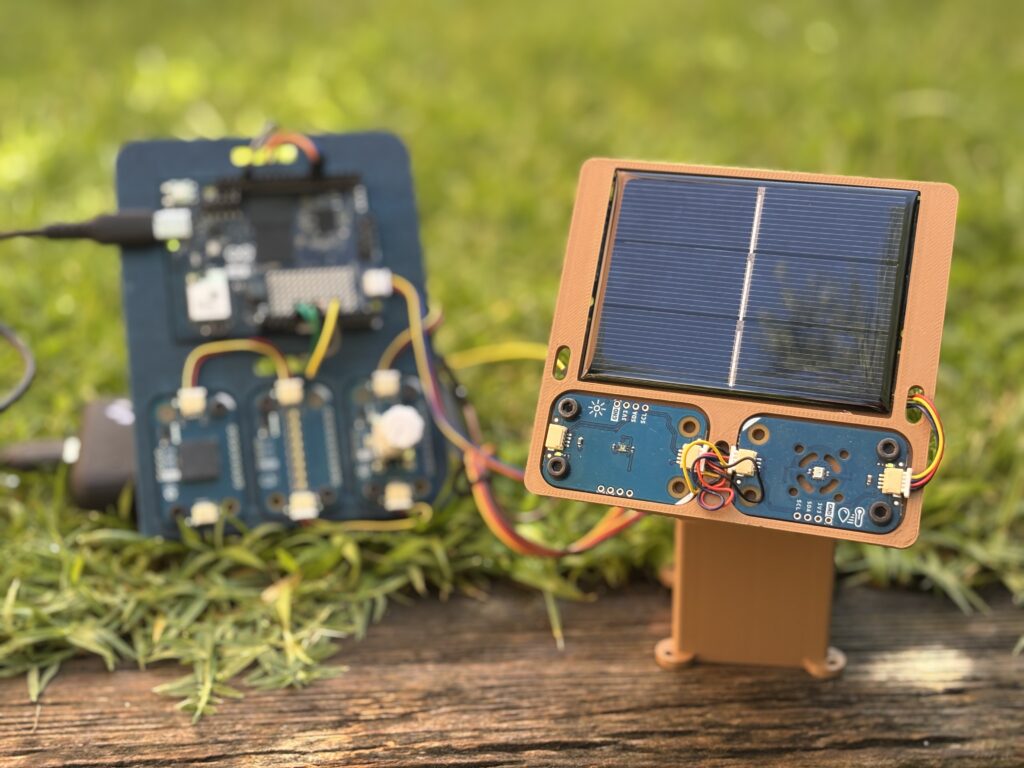
Solar energy is one of the most important technologies of our time, and understanding how it works can be… enlightening! Julián Caro Linares, Senior Field Technology Evangelist at Qualcomm Europe, built a project that helps learn about this topic with a hands-on approach: a fully functional, fully open-source smart solar panel system that adjusts to optimize solar exposure in real-time, built with UNO Q and a handful of Arduino® Modulino™ nodes. The best part? He explains every step so you can 3D print, assemble, and program it yourself, too!
A shining moment for UNO Q!
The system does a surprising amount for something you can build at home or in a classroom. Two servo motors move the solar panel continuously, orienting it toward the best position to capture energy from the sun based on a sky scan the board runs automatically. A live dashboard – served directly from the Linux side of UNO Q to any browser on your local network – shows panel orientation, a solar heatmap, real-time energy readings, infrared light levels, and local weather data. Just watching it update is pretty cool!
And the system doesn’t just chase the sun, it also protects itself. If temperatures climb too high, the panel adjusts to avoid damage. If a snowstorm or sandstorm is forecast, it moves to a protective vertical position. If it gets too dark to generate meaningful energy, it returns to a resting position and waits. And when dust or debris accumulates, it vibrates – just like NASA’s Mars rovers do – to shake itself clean.
All of this runs on UNO Q thanks to its dual-brain architecture: the Linux side handles the dashboard, weather data, and higher-level logic, while the real-time microcontroller reads sensors and drives the motors. The Modulino nodes do the sensing: Modulino Light reads both visible and infrared light, Modulino Thermo monitors temperature and humidity, Modulino Movement detects anomalous vibrations, and Modulino Vibro handles the self-cleaning function.
Everything was easily orchestrated through Arduino® App Lab, using three ready-to-use Bricks:
- weather_forecast: for an online API that always has the latest weather information;
- web_ui: to build and host the webpage;
- dbstorage_tsstore: to store and get data using a time series database.
Try it as a bright classroom project
Julián designed this explicitly as an educational tool, and it shows. The project is fully open-source – 3D files, code, and a complete step-by-step tutorial are all available on Arduino® Project Hub. On the hardware side, a small solar panel and two servo motors are all you need to add. For the software, Arduino App Lab handles the whole setup.
What makes it particularly compelling as a teaching tool is how many real concepts it touches at once. Students can explore renewable energy, sensor fusion, weather data integration, edge AI decision-making, real-time data visualization, and basic robotics – all within a single, coherent project that actually does something. Just observe when the panel tilts toward the sun, or switches to emergency mode before a storm: the logic behind is visible and understandable.
“It’s a very interesting project to do at home and to apply in the classroom,” he says, “to show how we can use UNO Q to solve real-life problems in actual solar panel installations.”
Check out the full tutorial on Arduino Project Hub.
In addition to the Arduino Store, UNO Q is available to order from DigiKey, Farnell, Mouser, Newark, RS Components, and Robu.in, along with our other authorized distributors and resellers.
Arduino, UNO, Modulino and the Arduino logo are trademarks or registered trademarks of Arduino S.r.l.